

Apple has officially launched iOS 26.2 Beta 2 for iPhone developers, introducing a modernized Measure app redesign, notable CarPlay privacy changes, and a host of system performance improvements. This second beta version continues Apple’s refinement of the iOS ecosystem, focusing on user experience, design fluidity, and safety in CarPlay environments.
The new update, identified as build number 23C5033g, is part of Apple’s continuing mission to make iOS more intuitive, beautiful, and secure ahead of the expected public release in December 2025.
Measure App Gets a Major Visual Redesign
One of the biggest highlights of iOS 26.2 Beta 2 is the Measure app redesign. Apple has completely reimagined its interface with a Liquid Glass-style UI, replacing traditional solid indicators with translucent, fluid-like visuals.
The redesigned interface enhances both aesthetic clarity and practical usability. When users tilt or move their iPhone, the measurement bubbles now respond with more precision and smooth animation, thanks to improved gyroscope calibration and ARKit 6 enhancements.
What’s New in the Measure App:
- A new Liquid Glass theme offering depth and realism.
- Enhanced Level tool feedback for better accuracy.
- More responsive motion sensors for precise surface alignment.
- Haptic feedback improvements, giving users tactile confirmation of correct leveling.
- Updated icons and a refreshed UI language consistent with iOS 26’s visual identity.
This change might seem subtle to casual users, but for architects, designers, and professionals who rely on Apple’s native measurement tools, it represents a more accurate and visually engaging experience.
More Read

CarPlay Enhancements Prioritize Privacy and Safety
Apple has also introduced new privacy-focused settings in CarPlay. Drivers can now disable pinned conversations in the Messages app while connected to their vehicle — a thoughtful addition designed to minimize distractions and protect privacy during drives.
The CarPlay privacy update is part of Apple’s broader strategy to reduce information overload in vehicles, complementing its earlier Focus Mode integration and Driving Focus automation.
Key CarPlay Updates in iOS 26.2 Beta 2:
- Option to hide or disable pinned conversations in Messages.
- Improved dashboard transitions for smoother multitasking.
- Better Bluetooth stability and reduced latency for Siri requests.
- Support for expanded in-car widgets and upcoming navigation APIs.
- Enhanced Siri voice isolation for improved voice recognition in noisy environments.
With these improvements, CarPlay feels more intelligent, private, and distraction-free, reinforcing Apple’s reputation for balancing innovation with safety.
More Read

System-Wide Performance and UI Improvements
Beyond these headline features, iOS 26.2 Beta 2 introduces a collection of under-the-hood optimizations and minor interface refinements.
Apple has polished transitions, animations, and menu behaviors to make them more consistent with its “Liquid Glass” visual identity, first introduced in iOS 26. Users have noticed smoother lock-screen animations, refined notification alerts, and subtle sound design tweaks.
Notable System Improvements:
- Faster edge-swipe gestures and smoother app switching.
- Improved Games app navigation for controllers and gestures.
- More responsive Control Center toggles.
- Minor updates to Weather, Clock, and Music widgets.
- Enhanced Face ID calibration for faster unlock times.
Apple’s internal release notes also hint at battery optimization and Wi-Fi stability improvements, although these remain unconfirmed by developers in early testing.
How to Download and Install iOS 26.2 Beta 2
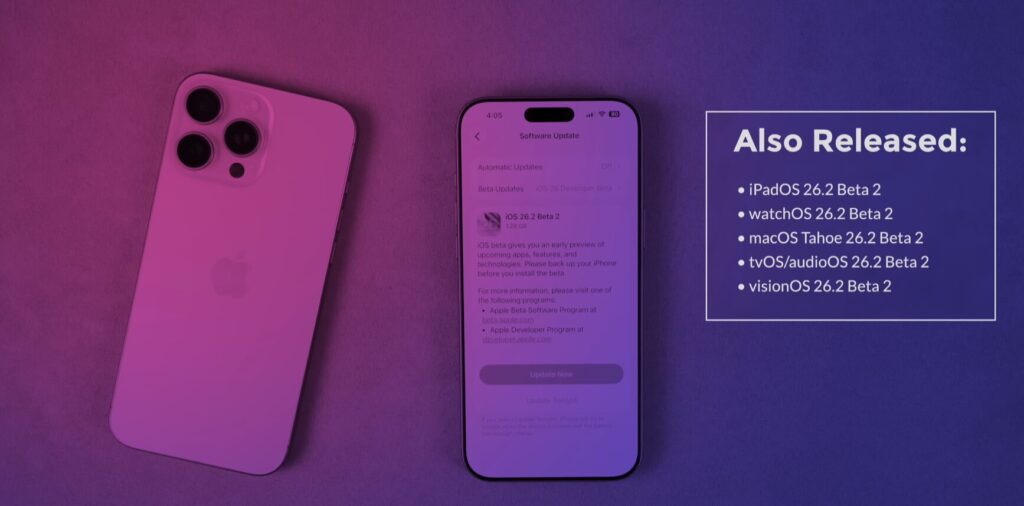
The iOS 26.2 Beta 2 update is currently available to registered developers through the Apple Developer Center and over-the-air (OTA) download via Settings → General → Software Update.
Apple typically follows this with a Public Beta within 48–72 hours, allowing non-developers to test new features before the final rollout.
Installation Steps:
- Enroll your device in the Apple Beta Software Program.
- Backup your iPhone using iCloud or Finder.
- Go to Settings → General → Software Update.
- Tap Download and Install to get the iOS 26.2 Beta 2 build 23C5033g.
Apple recommends installing beta software on secondary devices, as early builds may still contain bugs or incomplete features.
More Read

Developer Perspective: What’s New Under the Hood
For developers, iOS 26.2 Beta 2 brings several API updates and SDK improvements. Early testers have noted better Metal graphics performance, new SwiftUI layout options, and a more stable ARKit integration for real-world spatial measurements.
Developers can also explore new CarPlay templates and Measure app APIs, which may soon allow third-party integration with AR measurement tools — a step toward a more open, developer-friendly Apple ecosystem.
These changes align with Apple’s long-term roadmap of blending augmented reality, spatial computing, and real-world measurement capabilities across iPhone, Vision Pro, and iPad.
Why iOS 26.2 Beta 2 Matters for Users
While not a massive update like iOS 26’s debut, iOS 26.2 Beta 2 symbolizes Apple’s ongoing philosophy: refine, polish, and perfect. The focus on visual unity, privacy, and smoother performance demonstrates Apple’s attention to detail that defines its ecosystem.
Key Takeaways for iPhone Users:
- Measure app redesign modernizes a once-overlooked utility.
- CarPlay privacy tools make driving safer and more secure.
- Performance tweaks ensure smoother day-to-day navigation.
- Visual consistency enhances Apple’s design language.
In an era where many users crave visual refreshes and privacy-minded updates, Apple’s beta program offers both — balancing aesthetics and functionality.
Expected Public Release and Device Compatibility
The final version of iOS 26.2 is expected to roll out by mid-December 2025, ahead of the holiday season.
It will be compatible with:
- iPhone 16 and 16 Pro series
- iPhone 15 series
- iPhone 14, 13, 12, and SE (3rd generation)
Older models may receive limited feature support, especially for advanced Liquid Glass effects and CarPlay enhancements that rely on newer chipsets like the A18 Bionic.
The Bigger Picture: Apple’s Vision for 2026
The subtle yet meaningful changes in iOS 26.2 Beta 2 reflect Apple’s long-term vision for unified design and smarter system intelligence. As Apple prepares for iOS 27 and VisionOS 2, the company’s focus is clearly on cross-platform continuity — ensuring that every app, gesture, and animation feels the same whether on an iPhone, Mac, or headset.
By refining small details like the Measure app UI and CarPlay message controls, Apple continues to build an ecosystem where design meets functionality — a formula that keeps millions of users loyal and developers inspired.
Conclusion
The iOS 26.2 Beta 2 update might not revolutionize the iPhone, but it brings meaningful enhancements that elevate everyday experiences. From the beautifully redesigned Measure app to CarPlay’s privacy tools and smoother animations, Apple once again proves that progress often lies in the details.
As developers test and refine their apps ahead of the final release, iPhone users can look forward to a more polished, safer, and visually cohesive operating system in the coming weeks.
visit Homepage